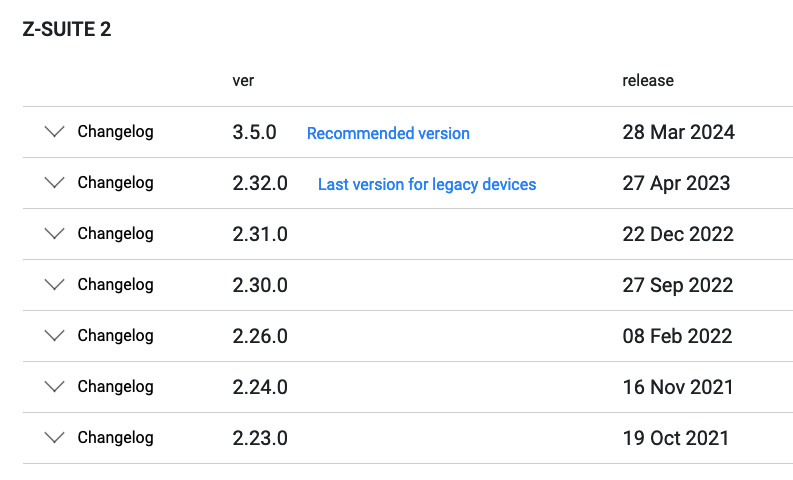
As you probably know, since its 3.5.0.0 version, the Z-Suite software does not support the following printers:
Zortrax M200
Zortrax M300
Zortrax Inventure
Zortrax Inkspire 1
We are currently working on a solution to provide software support for these products. In the meantime, we suggest using Z-Suite 2.32.0 that you can download from our Support Center.
That information should be reported in the version’s detail to avoid users download wrong software version.
At the moment last version is recommended so people that don’t look at this forum could make a mistake (at the moment old software advice to download latest upgrade… so a user with old printer goes directly to download page and install it making a big mess).
Additionally, we highlighted the 2.32.0 version of Z-Suite in the download section of the Support Center, just as @Lucio (and many others) suggested. As I said earlier, we are working on providing more software support for legacy devices.
Thank you for your patience and support. Please let us know how we can improve the user experience.
Is there any news on this? my M200 is still working perfectly and also considering what it cost i am not inclined to just toss it and buy another model at considerable cost.
I tried to check out the 4 beta version, but alas, it’s only again for the newer models. Can we look forward to another release that does include legacy printers?
here is another idea… there is this little tool that can transform g code into zcode. How hard would it be to make a similar tool so we can select an M300 plus for the timebeing and then have that convert the output file to zcode for M200 and M300 machines? I am still looking forward that the slicer simply supports the hardware, but at the least this could be a ‘quickfix’ so we all get to try the new features while you guys sort out support for legacy printers!
The Z Suite app doesn’t work properly on the new iOS 26 system. The issue is that both the old version 2.32 (for classic models) and the new 3.7 version do not display the infill widgets, and there are also problems with icons in the options — they simply don’t appear (for example, when selecting infill, only “draft” is visible). Please fix this.
Another issue: when slicing a model for a resin printer, the program often crashes completely, and the slicing process has to be started over again — the software on this system is very unstable.
The issue with program compilation can be resolved. However, all printer manufacturers support both systems, and it’s frustrating that so far I’ve done all my work on macOS, and now I have to use emulators/compilers and other workarounds. The program works, but some libraries likely need updating.
2.23.0 does not work correctly on mac os Tahoe 26.2, when is the solution promised in jul 24 going to happen. Are you abandoning those who got Zortrax off the ground with your early machines?