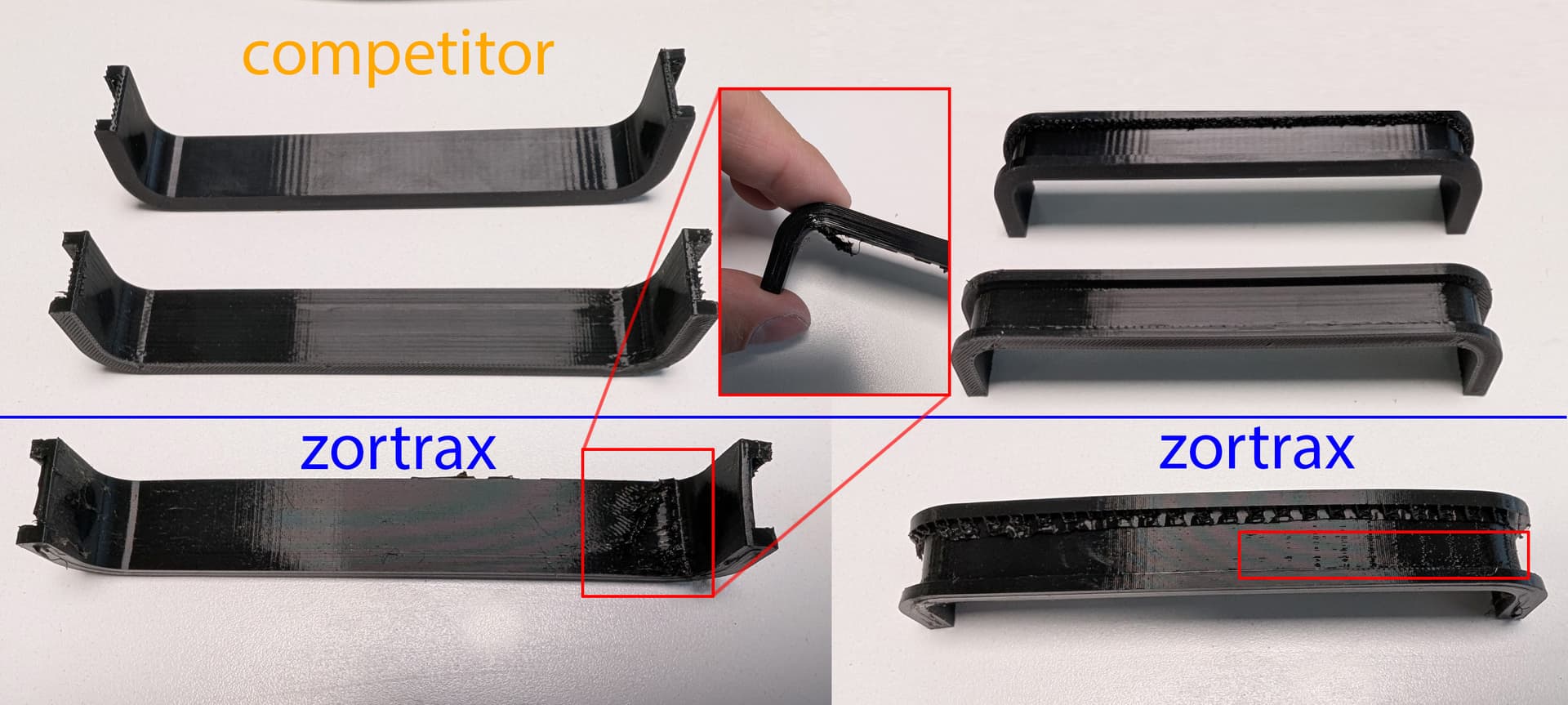
A client asked for a part in TPU and I noticed I had Z-FLEX laying around and I forgot why I wasn’t using it. I used the standard Z-FLEX profile and I dont get good results, at first there were hairs all over the place, because of the seams.
Picture in the attached files, top is a competitor with Ninjaflex and proprietary filament. Bottom is Zortrax.
I still cant believe that the seams are not better calculated, I mean the print head doesn’t need to go all the way on the other side of the part to start a new layer, just start a new layer where the print head is at the moment if possible. I know its not always possible.
But I digress. So, I tuned the settings and I somewhat got better results, but there was still a big clump of filament where the seams are. Also, with the basic settings the support dont come off. on the pictures I just left the part of the supports that I would need to cut.
Shouldn’t the basic printing profile with the proprietary filament work perfectly ? What are your settings ? Project in the attached files.
Hey, thanks for writing. Generally speaking, printing with any TPU material requires thorough drying. When it comes to prints with this material, there are many factors that could have influenced such results.
I’ll list a few, and you should consider these based on troubleshooting:
The hotend should be new and not used with other high-temperature filaments like Z-ULTRA or ABS.
MOST IMPORTANT: Dry the Z-FLEX (TPU) at 50–60°C for 5–6 hours. It’s crucial to consider how long the filament has been stored, as you mentioned earlier, and if it wasn’t kept in proper conditions, that could be the issue. TPU is very sensitive to UV and moisture.
I print with flexible TPU from various manufacturers and don’t have issues. Even these materials are combined with glass fibers. However, the printer requires certain modifications.
If you’re still having problems, write here, and I’ll run some tests on my end to compare.
Thanks for the quick answer. My TPU is always stored in bags with dry packs, its in a room with controlled humidity, its often down to 40% humidity and lower when printing. Anyway my NinjaFlex is oooooooooooooooold(3-4 years old), the Z-FLEX is probably 2 year younger than the Ninjaflex and the proprietary competitor finalement is probably 1 year old. I didn’t dry any of them for the tests.
All of them used a dirty nozzle that often print ABS and Nylon.
Anyway I will try to dry it and change the nozzle to see if it prints better. Can you print my project and post the picture before taking it off the plate? Maybe use a new Z-FLEX spool, use settings where the printhead move around, I want to see if it make hairs or clump with a new/dry spool.
Hi, generally speaking, I conducted some tests, and it seems that such issues may stem from the new hotend and how dry the filament is. Prints with softer filaments like TPU tend to come out better. Pay attention here: NinjaFlex has a Shore hardness of 85A, while Flex is 31D. Therefore, you need to adjust the print head accordingly, as the flow can affect how the filament is deposited during retraction, especially with harder filaments.
I’m not following, adjust what, exactly? Shouldn’t Z-FLEX print correctly using the default values in Z-SUITE?
I can try drying it, if you’re saying it’s not causing stringing in the project I shared with you, for example. My point is that it gave worse results than similar filaments that aren’t even from Zortrax.
I just wish I could use Z-FLEX but looking at the results posted earlier its not worth taking it out of its bag. Unless dried it changes completely, which I doubt.
Generally speaking, I want to tell you that printing with TPU requires a new nozzle and hotend, and additionally, the material must be dried. Try these things, and you’ll see the results. Best regards.
The picture in my original message contradict what you are saying, at least for other brand of TPU. Before I change the nozzle and the platform from perforated to glass, manual calibrate again, then wait a day until the Z-FLEX is dried just so I can test it again, do you have a picture of the print you were supposed to test? If you had good results, what settings did you use?
So far other than arguing this is not very useful.